Solution · Identity Security & Governance
Manage and protect identities intelligently.
Bring identities, roles and access rights into alignment. migRaven.MAX combines Identity Management (IDM), Identity and Access Management (IAM) and Governance: You create clear roles, control entry, change and exit, and keep permissions aligned with the task at hand. Max AI supports your decisions based on your existing environment.
Faster time to productivity
Prepare and provision accounts and matching access for new entries.
Fewer access risks
Identify unnecessary permissions and withdraw them in a targeted way during changes or exits.
Noticeably relieve IT
Standardize recurring tasks and involve business owners.
Trace decisions
Document reasons, approvals and results in context.
People, accounts and permissions grow apart
New tasks bring new permissions. Without clear rules, previous access remains in place – distributed across local systems, cloud services and applications.
Permissions keep growing.
At entry, existing accounts are copied as a template. After a change, old groups and access remain.Accounts are left behind.
One person uses several accounts and applications. Deactivation in Active Directory does not automatically complete the entire exit process.Responsibility is unclear.
Who decides on an access right? Who takes over groups, resources or the management of external guests?Coordination takes time.
Tickets, emails and individual scripts distribute tasks across several teams. The overall status and the reasons for changes are difficult to trace.Managing identities, access and responsibility together
migRaven.MAX combines the view of existing accounts and permissions with their management. This creates a continuous process from analysis through role assignment to regular review – across systems for Active Directory and file servers, Entra ID and Microsoft 365, as well as connected applications.
0Tage
Time-to-Value
12.480
Identities
0%
davon NHI
M. Weber
Marketing
Agentur Nord
Extern
svc-backup01
NHI · Dienstkonto
api-crm-sync
NHI · Token
FS · Marketing
Data class verified
SharePoint · Kampagnen
Data class verified
FS · Finanzen
Data class verified
CRM · Kontakte
Data class verified
Manage identities
Assign accounts to a person, create, change, pause and deactivate them according to defined specifications.
Assign access appropriately
Use role profiles for basic needs and have specific permissions managed by the responsible business units.
Maintain control permanently
Review and approve changes, define responsibilities and regularly review permissions.
Develop clear roles from grown permissions
A sound identity and access management starts with your existing environment. migRaven.MAX combines inventory, clean-up and role mining. This allows you to develop professionally reviewed role profiles from grown permissions – as a basis for reliable management and the automation of recurring tasks.
1 · Zusammenhänge verstehen
View accounts, groups, roles and resources together. Make direct and indirect permission paths as well as linked accounts visible.
2 · Altlasten bereinigen
Resolve unnecessary memberships, orphaned groups and unclear responsibilities before they are carried over into new processes.
3 · Rollenprofile ableiten
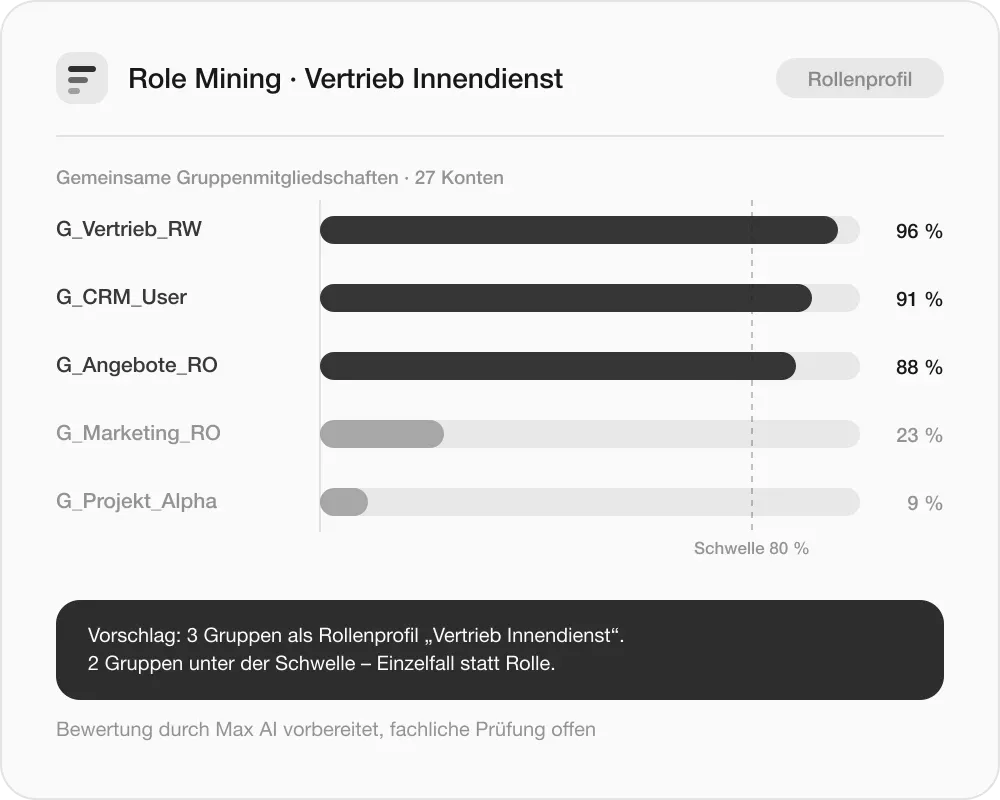
Use Role Mining to analyze existing group memberships and derive role profiles for business review.
4 · Vorgaben anwenden
Personas define policies for account types. Role profiles control matching group memberships; multiple profiles map cross-functional tasks.
0
Konten betrachtet
0
Altlasten bereinigt
0
Rollenprofile
Create a reliable process for every change
Five process templates connect the necessary steps. Dates, transition periods and approvals ensure that changes remain plannable.
Eintritt · passend ausgestattet starten
Prepare accounts and activate them on the start date. Persona and role profiles define which base groups and access are needed. A duplicate check helps identify existing accounts.
Wechsel · Rechte und Verantwortung anpassen
Provide new permissions in case of a task, department or location change. The responsible owners review which existing access and responsibilities remain appropriate. Permissions no longer needed are withdrawn after a defined transition period.
Beförderung · privilegierte Zugriffe prüfen
Grant extended permissions deliberately. New privileged access goes through four-eyes approval; transition periods take the ongoing handover into account.
Pausieren · Abwesenheit und Rückkehr sicher steuern
Deactivate accounts in a controlled manner during extended absence, such as parental leave or sabbatical. Depending on the defined procedure, permissions are additionally withdrawn. Before reactivation, those responsible check whether access and responsibilities still match the current task.
Austritt · Zugriffe beenden und Verantwortung übergeben
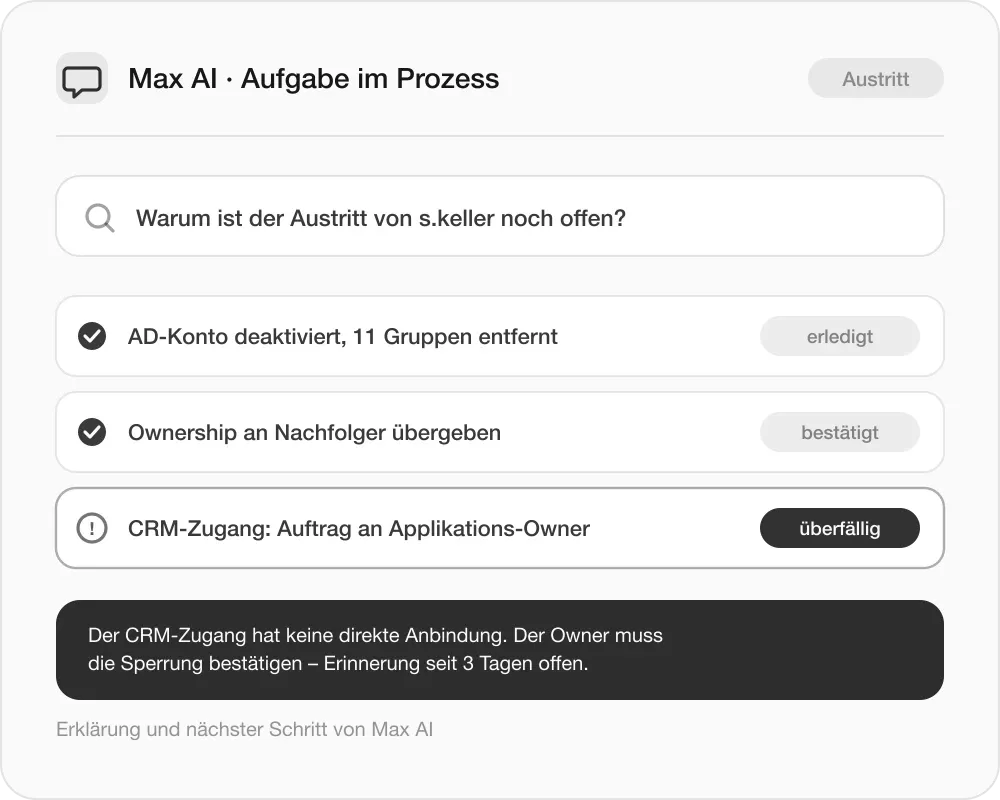
Take linked accounts, groups, licenses and approvals into account together. Successors confirm the takeover of responsibilities – including for managed guest accounts. Unresolved handovers remain visible. Automated actions and tasks requiring confirmation are tracked within the same process.
Persona Vertrieb Innendienst · 3 Basisgruppen · Duplikatsprüfung ohne Treffer
Neue Rechte bereitgestellt · Owner-Prüfung 2 offen · Übergangszeit 14 Tage
Admins-Marketing (privilegiert) · Vier-Augen-Freigabe 1 / 2
Konto deaktiviert · Lizenz entzogen · Prüfung vor Reaktivierung geplant
11 Gruppen entfernt · Ownership übergeben · CRM-Auftrag an App-Owner
Let access decisions be made where the need is known
Role profiles cover the basic requirements. For project-specific and changing access, data owners and group owners make the business decisions within defined rules. Ownership means business responsibility – being assigned as a data owner does not automatically grant access to the files.
Verantwortliche benennen
Assign responsible persons to data areas, groups and external guest accounts. This makes clear who assesses need and further use.
Self-Service ermöglichen
Manage permissions and create directories and teams based on defined templates. Responsibilities and policies accompany the usage.
Zugriffe regelmäßig überprüfen
Business owners check whether permissions and guest accounts are still needed. Decisions are recorded in a traceable manner.
Understand impact. Approve changes. Review results.
Before execution, it becomes visible which systems, accounts and permissions are affected. Decisions and technical implementation remain connected in a traceable process.
1 · Vorschau und Begründung
Review planned access grants and withdrawals, take indirect effects into account and document the reason for the change.
2 · Freigabe und Ausführung
Confirm changes via the designated approval process and execute them on schedule through the central action queue.
3 · Vollständig abschließen und nachweisen
Track technical steps and open tasks. A process is only complete once the required decisions, handovers, and manual tasks have also been completed. Reasons, approvals, and results remain traceable.
0+
Zugänge
0−
Entzug
0
Systeme
0
indirekt betroffen
Support based on your actual environment
Max AI helps you understand your existing environment, prepare role models, and plan the introduction of your identity and access management. In day-to-day operations, Max AI supports tasks and decisions. Technical review and approval remain with the responsible parties. You determine the approved AI provider and the usable models; changes remain bound to the designated permissions and approvals.
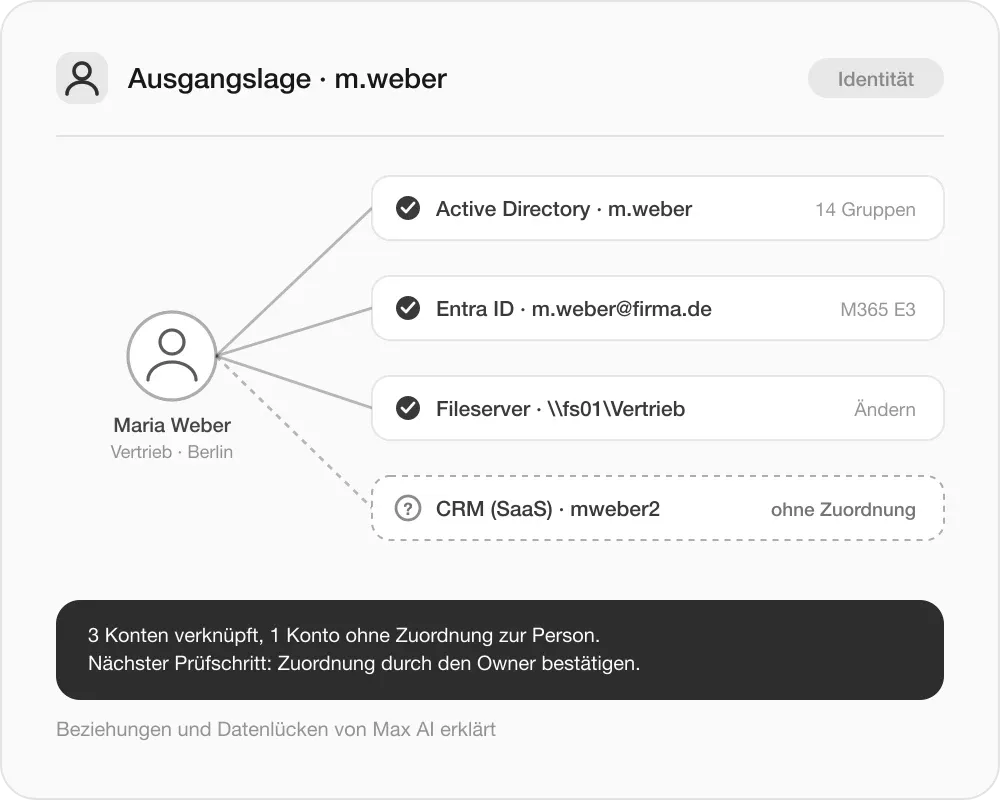
Understanding the starting situation
Understanding the starting situation
Explain recorded identities, access, and relationships. Identify anomalies and data gaps and point out the next review steps.
Preparing role models
Preparing role models
Explain results from analysis and role mining and support the technical evaluation of potential role profiles.
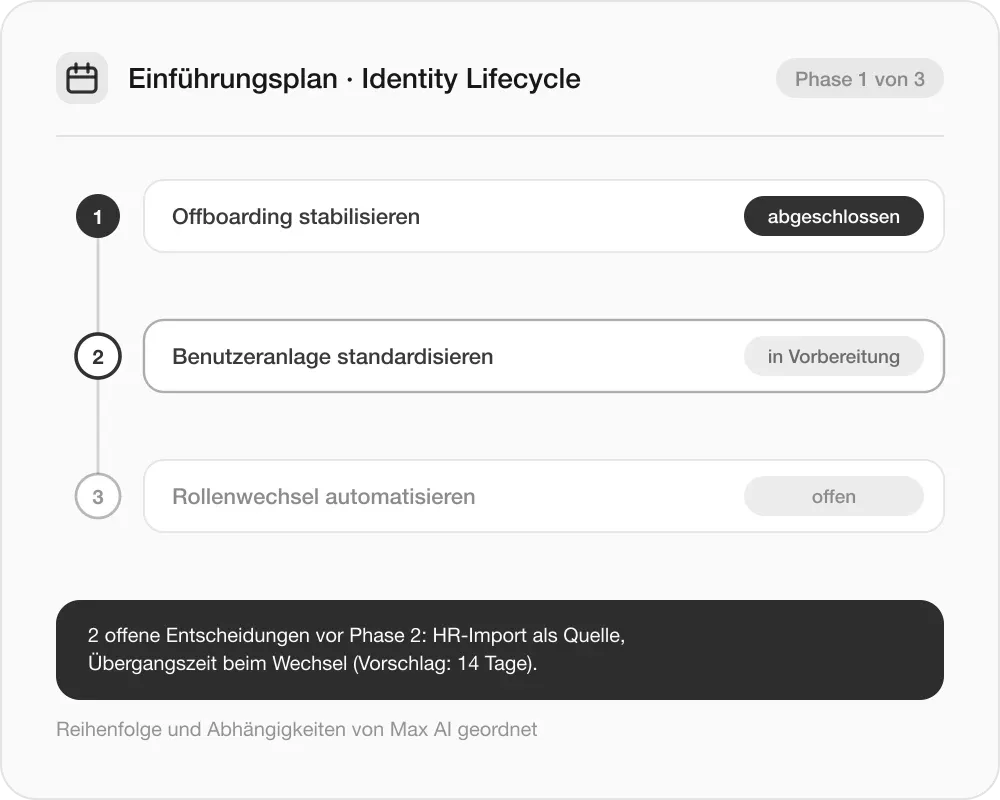
Planning the introduction
Planning the introduction
Organize goals, dependencies, and integration steps. Prepare a suitable initial process scope and make open decisions visible.
Supporting day-to-day operations
Supporting day-to-day operations
Explain tasks and error messages in an understandable way, improve justifications, and provide support for the next steps.
Connecting to existing systems and processes
Start with transparency and organized structures. Then standardize the most important processes and expand them to suit your environment.
Vorhandene Grundlagen nutzen
Connect Microsoft systems and analyze existing accounts and permissions. HR data imports, interfaces, and existing scripts can be integrated as needed.
SaaS-Anwendungen in den Prozess einbinden
For SaaS applications, the responsible application owners receive specific assignments and confirm their implementation. Open and overdue tasks are tracked. This way, access outside the directly connected systems also remains part of your identity and access management.
Einführung mit klarer Reihenfolge
Offboarding stabilisieren · Benutzeranlage standardisieren · Rollenwechsel auf geprüfter Grundlage automatisieren.
Checking whether permissions still fit
Identity management remains an ongoing task. Regular reviews, documented changes, and comparable metrics help maintain the order achieved.
Abweichungen erkennen
Regularly check accounts and their assignment against defined requirements and make the need for action visible.
Verantwortung nachhalten
Integrate ownership and recertification into operations. Also take guests and transferred responsibilities into account.
Fortschritt belegen
Track the development of account hygiene, risks and ownership coverage based on key metrics and change history.
0%
Kontenhygiene · +8
0
Risiko-Score · −11
0%
Ownership · +22
Frequently asked questions
on identity and access management
Quick answers on roles, processes and approvals. Anything still open is clarified directly by ourteam– without detours.
Get in touch